Syncupp
Features
Pricing
Docs
AboutContact
Start freeSign UpLog InSign In
Start free

Plan & deliver

Boards & viewsKanban, list, and calendar in one click.Time trackingTimers, work logs, and timesheet exports.Chat & meetingsTeam channels and Google Calendar sync.

Motivate & manage

GamificationCoins, streaks, leaderboards, rewards.Attendance & leaveGPS check-ins and instant leave approvals.Roles & client portalControl who sees what, per project.

Automate

WhatsApp & SlackCreate tasks and get alerts from chat.AI connectorUse Claude, ChatGPT, or Cursor on your work.Webhooks & ZapierTrigger workflows across your tools.
Take Syncupp with youDownload on theApp StoreGet it onGoogle PlayTour all features →Compare plans →

Help center

Getting StartedYour command center, health, and KPIs.Projects & TasksBoards, columns, and live workflows.Chat & MeetingsCalendar, deadlines, and Google sync.HR & OperationsCheck-ins, hours, and work timings.GamificationCoins, streaks, and rewards.
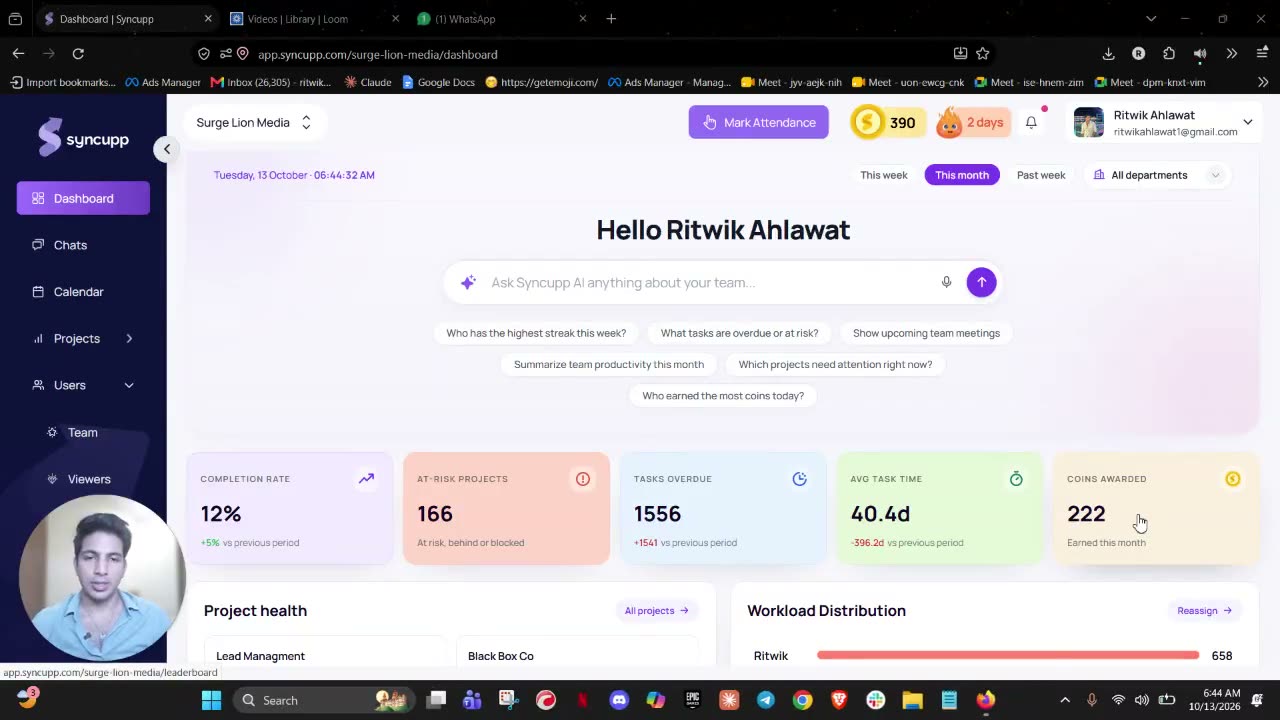
Getting StartedSee project health, workload, and KPIs on one screen. This walkthrough shows how the dashboard helps you spot what needs attention before the day gets away.
For developersDeveloper docsAI connector (MCP)WebhooksBrowse all docs →
PrivacyTermsCancellationShipping

Legal

Cancellation and Refund

How cancellations and refunds work for Syncupp subscriptions.

Last updated September 2026

We at Surge Lion Technologies Private Limited understand that your needs may change over time. You can cancel your Syncupp subscription at any time.

Money-back guarantee

Every Syncupp plan comes with a 7-day money-back guarantee. If you cancel within the first 7 days of your paid subscription, you will receive a full refund, no questions asked. After 7 days, no refunds will be provided as your subscription will have started.

When cancellation takes effect

To cancel your subscription, go to your Syncupp account and follow the cancellation instructions. Your subscription will be cancelled at the end of your current billing period.

Access after cancel

You can continue using Syncupp until the end of your paid subscription period. All your data and content will be securely erased after your subscription ends, according to our retention practices.

Need help?

Please contact our support team at Surge Lion Technologies Private Limited if you have any other questions regarding cancelling or refunds. We're always happy to help!

How to cancel your subscription

  1. Log in to your Syncupp account
  2. Navigate to Account Settings
  3. Select "Subscription" from the menu
  4. Click on "Cancel Subscription"
  5. Follow the prompts to confirm cancellation

Note: Your subscription will remain active until the end of your current billing period.

Contact usBack to product

Questions about our policies?
We're here to help.

Reach out anytime. Our team is here to help.

Start free trial
Syncupp

The world's first gamified team superapp. Unifying task management, client collaboration, smart automations, and team performance.

Get the mobile appDownload on theApp StoreGet it onGoogle Play
Featured on Twelve Tools
Official Cloud APIWhatsApp Integration

Product

  • Features Overview
  • Plans & Pricing
  • Kanban Boards
  • Time Tracking
  • Overdue Automation

Developers & AI

  • Documentation Hub
  • Claude Code (MCP)
  • Webhooks API
  • WhatsApp Automation

Company

  • About Us
  • Contact Support
  • Twelve Tools Directory

Legal & Trust

  • Privacy Policy
  • Terms of Service
  • Cancellation & Refund
  • Shipping & Delivery
Enterprise Security & Compliance Standards
256-Bit SSLBank-Grade TLS
PCI-DSSLevel 1 Certified
GDPRCompliant
AES-256Encrypted At-Rest
SOC 2 Type IISecurity Ready
#2 on AppSumoPay once and keep Syncupp for life, from $49.Grab the deal

© 2026 Syncupp Inc. All rights reserved.

Engineered with precision for ambitious teams & agencies.