ClickUp Alternatives for Small Teams (2026): 6 Simpler Tools
ClickUp can do almost anything, and that is the problem for a 10-person team. Six simpler alternatives compared on setup time, real monthly cost and whether people keep their tasks updated.

On this page
- What is a ClickUp alternative?
- Which ClickUp alternatives are best for small teams? (comparison table)
- How much do ClickUp alternatives cost for a 10-person team?
- Why do small teams switch away from ClickUp?
- The 6 best ClickUp alternatives for small teams, reviewed
- How do you choose the right ClickUp alternative?
- How do you move a small team off ClickUp without losing work?
- FAQ: ClickUp alternatives for small teams
- Which ClickUp alternative should you choose?
- About Syncupp
- Sources
ClickUp can do almost anything, and that is the problem for a 10-person team. You spend a week building Spaces, Folders, Lists and custom fields, and a month later half the team still updates work in chat instead of the tool. This guide compares six simpler ClickUp alternatives on what small teams actually care about: setup time, monthly cost and whether people will keep their tasks updated.
What is a ClickUp alternative?
A ClickUp alternative is any task or project management tool a team uses instead of ClickUp to plan work, assign tasks and track progress. For small teams, the useful alternatives are the ones that do less: fewer settings, fewer layers and a faster path from "signed up" to "the whole team updates tasks daily."
The cost of tool overhead is real. Asana's own Anatomy of Work Global Index 2023, a survey of 9,615 knowledge workers in six countries, found people spend 58% of their day on "work about work" (status updates, searching for information, switching apps) and use 8.8 apps on average. A tool that adds configuration on top of that rarely helps a small team. More on that in our workplace accountability statistics.
Which ClickUp alternatives are best for small teams? (comparison table)
Six tools stand out for small teams in 2026, each simpler than ClickUp in a different way. The table below compares entry paid pricing, the team each fits, its standout feature and its main limitation. Prices were checked on each vendor's pricing page in November 2026 and assume annual billing unless stated.
| Tool | Entry paid price (Nov 2026) | Best for | Standout feature | Main limitation |
|---|---|---|---|---|
| Syncupp | $5/user/mo yearly ($8 monthly), up to 20 users; $149/mo flat for unlimited users | 5–100 person teams that struggle to get tasks updated | Points, streaks and leaderboards plus chat, meetings and attendance in one app; WhatsApp and Slack native | No white-label; fewer advanced project views |
| Trello | $5/user/mo yearly ($6 monthly), Standard | Small teams that think in simple boards | Fastest setup of any tool here | Free plan capped at 10 collaborators; thin reporting |
| Basecamp | $79/mo flat for up to 10 users (Pro) | Teams that want calm communication with clients | Flat price, message boards and chat built in | Project caps per plan; few task views |
| Asana | $10.99/user/mo yearly ($13.49 monthly), Starter | Teams running structured, repeatable projects | Mature timelines, rules and portfolios | Costliest per seat here; free plan limited to 2 users |
| monday.com | $9/seat/mo yearly (Basic); $12 Standard | Visual teams who want colourful, flexible boards | Easy no-code board building and automations | Plans start at 3 seats; key automations sit on higher tiers |
| Notion | $10/member/mo (Plus) | Teams whose work lives in docs and wikis | Docs, databases and tasks in one workspace | Task management is DIY; AI agents on Business tier |
| For reference: ClickUp | $9/user/mo yearly (Core) | Teams that want one highly configurable workspace | Near-unlimited customisation | Setup and learning curve; free plan has 60 MB storage |
How much do ClickUp alternatives cost for a 10-person team?
For a 10-person team, entry paid plans range from about $50 to $110 a month in November 2026. Syncupp and Trello are cheapest at $5 per user on yearly billing, Basecamp is $79 flat, and Asana Starter is the most expensive. ClickUp Core sits in the middle at about $90.
Monthly cost for a 10-person team on entry paid plans
USD per month, yearly billing where offered, November 2026
The spread is small enough that price rarely decides the switch. What changes the real cost is setup time and whether the team keeps using the tool; per-seat minimums (monday.com starts at 3 seats) and project caps (Basecamp) matter more as the team grows.
Why do small teams switch away from ClickUp?
Small teams usually leave ClickUp for three reasons: setup takes too long, the team stops updating tasks, and the bill grows as add-ons pile up. ClickUp is a capable product built to serve large, varied organisations. A 5–30 person team rarely needs most of it, and pays for that breadth in time.
- Setup overhead. ClickUp organises work in a hierarchy of Workspaces, Spaces, Folders and Lists, with custom statuses and fields at each level. Someone has to design that structure, and every new hire has to learn it.
- Low adoption. When the tool feels heavy, people go back to WhatsApp, Slack or email for updates. The board goes stale, and the manager ends up chasing status in chat anyway. Our workplace gamification statistics cover what actually gets people updating.
- Free plan limits. ClickUp's Free Forever plan caps storage at 60 MB and allows 100 automation actions per workspace per month (ClickUp pricing, Nov 2026). Teams hit those limits fast.
- Feature sprawl you still pay for. AI credits, docs, whiteboards, CRM views and dashboards are useful, but a small team often needs only tasks, a shared calendar and a place to talk.
The pattern matters for choosing a replacement. If adoption was the problem, a tool with fewer features but a reason for people to come back each day will beat a tool with more features.
The 6 best ClickUp alternatives for small teams, reviewed
Each tool below gets the same structure: who it is best for, key features, pricing as of November 2026, pros, cons and a verdict. Syncupp is listed first because it was built for the exact problem most small teams have with ClickUp (people not updating tasks), but it is not the right pick for everyone, and the cons say where it falls short.
1. Syncupp: best for small teams that need people to actually update tasks
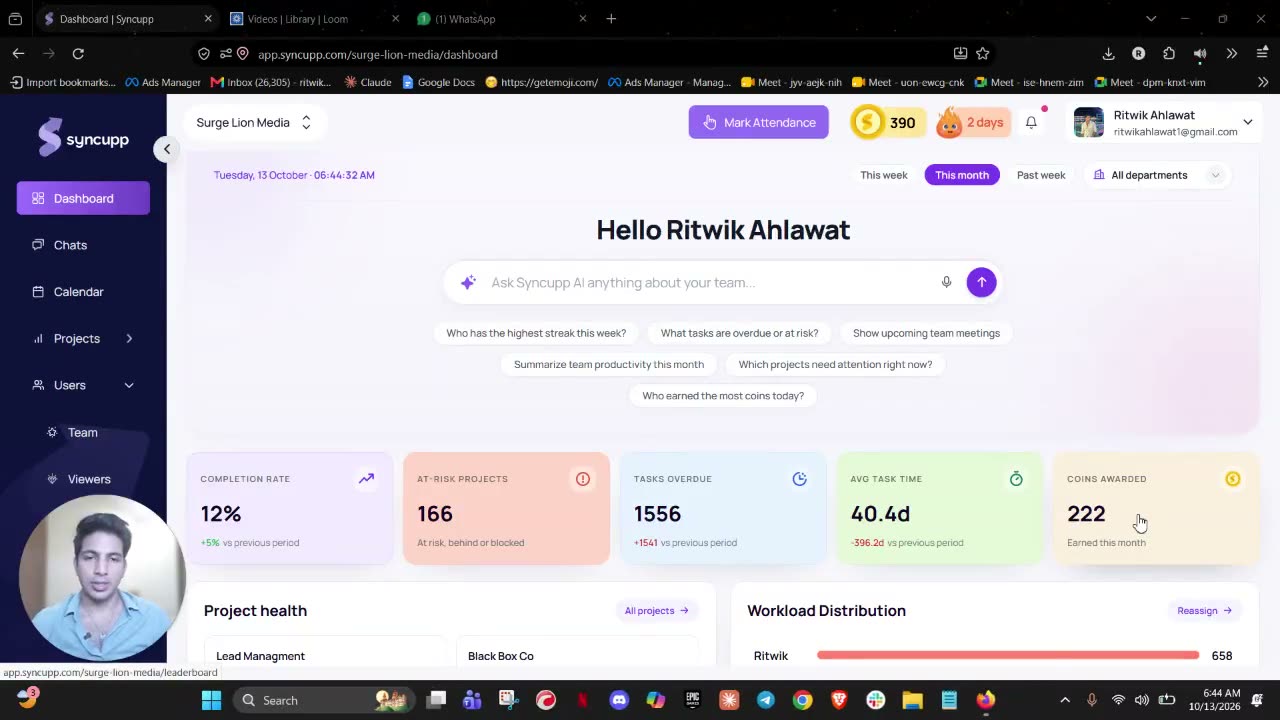
Syncupp is a gamified team management app with native WhatsApp and Slack integration. It combines tasks, team chat, meetings, attendance and leave in one tool, and rewards completed work with points, streaks and leaderboards. It suits teams of 5–100 people that want one simple tool instead of four.
Best for: agencies, accounting firms, real estate teams, trading and import-export businesses, and remote or hybrid teams of 5–100 people.
- Tasks on Kanban, list and calendar views, with approvals before a task counts as complete
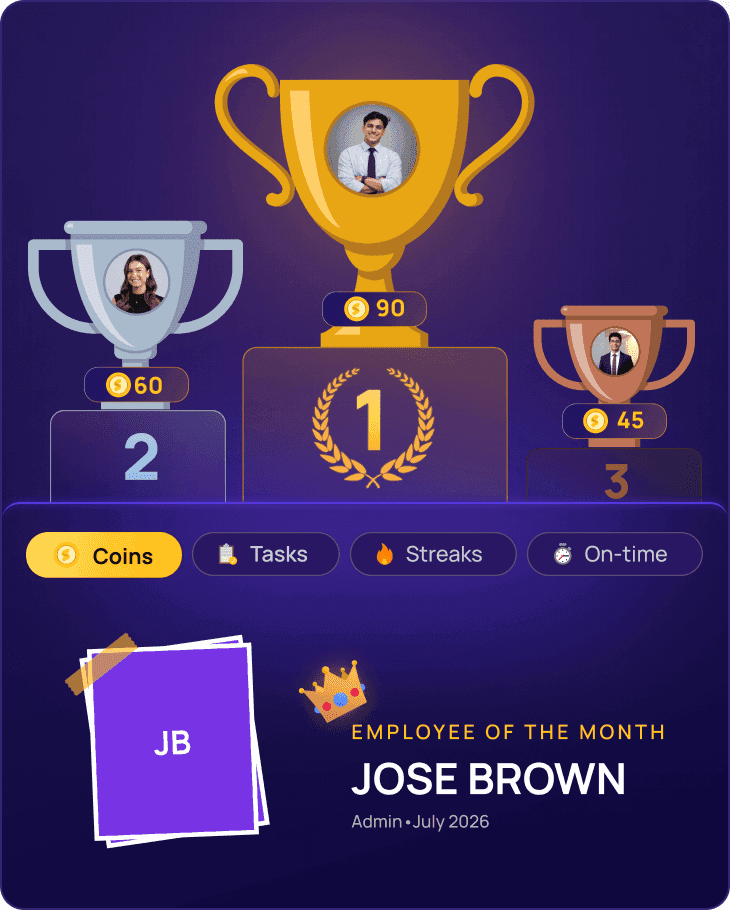
- Gamification: points (coins and XP), streaks, badges, leaderboards and a rewards section managers can stock
- Team chat and meetings in the same app
- GPS or radius-based attendance, leave requests, and timers with timesheets you can export as CSV
- An AI agent you can message in the app, on WhatsApp or on Slack to create, assign and update tasks, with voice notes on WhatsApp and in the app
- MCP connector for Claude (the site also lists ChatGPT and Cursor), plus Zapier, Make and Pabbly
- Rolling out: an AI meeting note-taker and project reports (weekly client report, monthly leadership report with AI summary)
Pricing (Nov 2026): Small teams plan, up to 20 users: $8/user/month billed monthly, $7 quarterly, $6 half-yearly or $5 yearly. Growing teams plan: $149/month flat for unlimited users, with priority support and onboarding. Free trial, no credit card (Syncupp pricing).
Pros
- Gamification gives people a daily reason to update tasks, which is where most small-team tools fail
- Replaces several tools (an Asana-style task board, Slack-style chat, a Clockify-style time log and BambooHR-style attendance) for one price
- Teams can manage tasks from WhatsApp or Slack without opening another app
- Flat $149 plan keeps cost predictable once a team passes about 20 people
- 160+ paying teams across India, Malaysia, Singapore, the Philippines and Thailand
Verdict: Choose Syncupp if your real ClickUp problem is that the team does not use it. If you need Gantt-style planning or deep portfolio reporting, look at Asana or stay on ClickUp. For a feature-by-feature view, see our Syncupp vs ClickUp comparison.
2. Trello: best for the simplest possible boards
Trello is a Kanban board tool from Atlassian: lists of cards you drag from left to right. It is the fastest tool here to set up, and the easiest for non-technical teams to understand on day one.
Best for: small teams with simple, visual workflows (content calendars, hiring pipelines, small client projects).
Key features: boards, lists and cards; checklists, due dates and labels; built-in automation; Power-Ups for integrations; extra views (calendar, timeline, table) on Premium.
Pricing (Nov 2026): Free for up to 10 collaborators and 10 boards per workspace. Standard $5/user/month yearly ($6 monthly). Premium $10 yearly ($12.50 monthly). Enterprise $17.50/user/month billed yearly (Trello pricing).
Pros
- Almost no learning curve
- Strong free plan for tiny teams
- Low per-seat price
Cons
- The free plan stops at 10 collaborators
- Reporting and workload views are thin
- Many teams add Power-Ups to fill gaps, and complex projects outgrow single boards
Verdict: The right choice if you want something simpler than ClickUp and your work fits on a few boards. Less suited if you need attendance, chat or accountability built in.
3. Basecamp: best for flat pricing and calm client communication
Basecamp is a project communication tool from 37signals that puts to-dos, message boards, chat, schedules and files inside each project. It favours fewer notifications and written updates over dashboards.
Best for: agencies and service teams that share projects with clients and want one predictable bill.
Key features: to-dos, message boards, card tables (Kanban), group chat, schedules, docs and files; client access; AI agent connections listed on all plans.
Pricing (Nov 2026): Free for 1 project and up to 3 users. Freelancer $29/month (up to 5 users, 3 projects). Pro $79/month (up to 10 users, 8 projects). Pro Plus $99/month (up to 15 users, 12 projects). Pro Unlimited $199/month billed annually or $329 monthly, unlimited users and projects. No per-user fees (Basecamp pricing).
Pros
- Flat pricing
- Communication and tasks in one place
- Clients can be invited cleanly
Cons
- Each plan caps active projects
- Fewer task views and reports than ClickUp
- The jump to unlimited projects is steep for a growing team
Verdict: Good for client-facing teams that value calm communication over task metrics. Teams that need attendance, gamification or deep reporting will want something else.
4. Asana: best for structured, repeatable projects
Asana is a work management platform built around projects, tasks and dependencies, with list, board, calendar and timeline views. It is the most mature tool here for teams that run the same kind of project again and again.
Best for: marketing, operations and product teams with defined processes and multiple projects running at once.
Key features: list, board, calendar and timeline views; rules for automation; forms; goals and portfolios on higher tiers; built-in AI features.
Pricing (Nov 2026): Personal free plan for up to 2 users. Starter $10.99/user/month yearly ($13.49 monthly). Advanced $24.99 yearly ($30.49 monthly). Enterprise on request (Asana pricing).
Pros
- Polished and reliable
- Strong templates and rules
- Scales well as the team grows
Cons
- The highest per-seat cost in this list
- The free plan only covers 2 users
- Still a structured tool that needs a process owner, so adoption is not automatic
Verdict: Pick Asana if you want ClickUp-level structure with a cleaner interface and can pay for it. For teams under 10 with simple work, it is often more tool than needed.
5. monday.com: best for visual, customisable boards
monday.com is a work operating system built on colourful, table-style boards that teams shape with columns, views and automations. It is easier to set up than ClickUp but still very flexible.
Best for: teams that want to build their own workflows visually without code.
Key features: boards with custom columns; Kanban, timeline, calendar and Gantt views on paid tiers; automations and integrations; dashboards.
Pricing (Nov 2026): Free for up to 2 seats. Basic $9/seat/month, Standard $12, Pro $19, all billed yearly; the FAQ states plans start from 3 users (monday.com pricing).
Pros
- Very easy to make boards look and work the way you want
- Good dashboards
- Large template library
Cons
- Seat minimums mean small teams can pay for seats they do not use
- The most useful automations and views sit on Standard and above
- Flexibility can recreate ClickUp's setup burden
Verdict: A strong pick for visual teams that enjoy designing workflows. If the goal is less configuration, start with Trello, Basecamp or Syncupp instead.
6. Notion: best when your work lives in docs
Notion is a connected workspace for docs, wikis and databases, where tasks are rows in a database you design. It shines when planning, documentation and tasks belong together.
Best for: small teams that write a lot (content, product, research) and want one place for docs and to-dos.
Key features: pages and wikis; databases with board, list, calendar and timeline views; templates; AI features, with Notion Agent and AI Meeting Notes on Business.
Pricing (Nov 2026): Free plan. Plus $10/member/month, Business $20/member/month; yearly billing saves up to 20% (Notion pricing).
Pros
- Best docs and knowledge base in this list
- Very flexible
- Good value if it replaces a separate wiki
Cons
- Task management is do-it-yourself, so someone has to build and maintain the system
- No native attendance, chat or workload features
- Easy to end up with as much setup as ClickUp
Verdict: Choose Notion if documents are the centre of your work. For task accountability on a busy operations team, a purpose-built task tool works better.
How do you choose the right ClickUp alternative?
Choose a ClickUp alternative by naming the one problem ClickUp failed to solve, then picking the tool built around that problem. Feature checklists push teams back toward complex tools. A small team does better matching one clear pain to one clear strength, then running a two-week trial with real work.
Pick the ClickUp alternative that fixes why ClickUp failed
- Team won't keep tasks updatedSyncuppPoints, streaks, WhatsApp tasks
- We only need simple boardsTrelloFastest setup, simple boards
- Per-seat bills, lots of client workBasecampFlat $79 for up to 10 users
- Repeatable, structured projectsAsanaTimelines, rules, templates
- We want to design visual workflowsmonday.comNo-code boards, dashboards
- Our work lives in docs and wikisNotionDocs plus task databases
If more than one row fits, choose the problem that costs you the most hours each week.
Decision checklist before you commit
- Can a new hire create, update and close a task within 10 minutes of joining?
- Will people update tasks where they already talk (WhatsApp, Slack) or will they need another app open all day?
- What is the monthly cost at today's headcount and at double it? Check seat minimums and project caps.
- Do you need attendance, leave or approvals in the same tool, or is that handled elsewhere?
- Do you bill clients by the hour? If yes, check each tool's timesheets and whether they export billable hours.
- Does the free plan or trial let your whole team test it with real work for two weeks?
- Can you export your data if you leave?
How do you move a small team off ClickUp without losing work?
Moving a small team off ClickUp takes one to two weeks if you export only active work, start with a simple structure and set one clear rule for where updates happen. Most failed switches copy ClickUp's complex setup into the new tool. Start simpler than you think you need.
- Export what is live. Export active tasks from ClickUp as CSV; archive finished work rather than migrating it.
- Rebuild with three to five statuses. For example: To do, In progress, In review, Done.
- Import or recreate active tasks with owner and due date. Skip custom fields you rarely filter by.
- Set one rule: task updates happen in the new tool (or through its WhatsApp or Slack integration), not in side chats.
- Run both tools for one week only, then switch ClickUp to read-only.
- Review after 30 days: which tasks are overdue, who updates daily, what still lives in chat.
FAQ: ClickUp alternatives for small teams
What is the best ClickUp alternative for a small team?
It depends on why ClickUp failed. If the team stopped updating tasks, Syncupp's points, streaks and leaderboards address adoption directly. If you just want simple boards, Trello is the fastest to learn. If you want flat pricing and calm client communication, Basecamp fits. Asana suits teams with structured, repeatable projects.
Is there a free alternative to ClickUp?
Yes. Trello is free for up to 10 collaborators per workspace, Basecamp has a free plan for one project and three users, and Asana and monday.com offer free plans for up to two users (as of November 2026). Syncupp offers a free trial without a credit card rather than a permanent free plan.
What is the cheapest ClickUp alternative for a 10-person team?
On yearly billing, Syncupp and Trello Standard both cost about $50 a month for 10 users ($5 per user). Basecamp Pro is $79 flat for up to 10 users. ClickUp Core is about $90, monday.com Basic $90, Notion Plus $100 and Asana Starter about $110, based on vendor pricing pages in November 2026.
Is ClickUp too complicated for small teams?
Not always. Teams with a dedicated operations person who enjoys configuring tools can run ClickUp well. Many small teams, though, find its hierarchy of Spaces, Folders, Lists and custom fields slows setup and onboarding, and people drift back to chat for updates. That adoption gap is the most common reason teams switch.
Which ClickUp alternative works with WhatsApp?
Syncupp has native WhatsApp integration: team members can create, assign and update tasks, apply for leave and get a morning briefing by messaging its AI agent on WhatsApp, including voice notes. Most other tools in this list connect to WhatsApp only through third-party automation services. See how to manage your team on WhatsApp without losing tasks.
Do any ClickUp alternatives include attendance tracking?
Syncupp includes GPS or radius-based attendance, leave requests, and timers with timesheets you can export as CSV, alongside tasks. Trello, Basecamp, Asana, monday.com and Notion do not include native attendance in their core plans, so teams usually add a separate HR or attendance tool.
Which ClickUp alternative should you choose?
For most small teams, the best ClickUp alternative is the one your team will open every day. Trello wins on simplicity, Basecamp on flat pricing, Asana on structure, monday.com on visual flexibility and Notion on docs. If your real problem is that tasks go stale while updates live in chat, Syncupp is built for that: it makes progress visible, rewarding and reachable from WhatsApp or Slack.
About Syncupp
Syncupp is a gamified team management app with native WhatsApp and Slack integration that brings tasks, team chat, meetings, attendance and leave into one tool, with points, streaks and leaderboards that keep teams updating their work. It is built for small and mid-size teams of 5–100 people, and costs $5–$8 per user per month (up to 20 users) or $149 a month flat for unlimited users.
